
X Launcher Pro
Launcher DeveloperArt & Design
4.8342.00 Reviews
- Version
- 3.4.12
- Installs
- 50.00K
- Age Rating
- Everyone
Screenshots
Our Review of X Launcher Pro
 Analysis by Appyee
If you’ve ever found yourself daydreaming about having the sleek look of an iPhone interface on your trusty Android device, then X Launcher Pro might be just the ticket to make that dream a reality. As someone who loves to tinker with their phone’s appearance, I took this app for a spin to see if it could really deliver on its promises.
What the iPhone-inspired look means in practice
X Launcher Pro is an Android customization app from Launcher Developer, aimed at people who want a different home-screen style without giving up their Android phone. Its iOS-inspired appearance is the main appeal, but it is worth setting expectations: a launcher changes the way parts of Android look and feel; it does not turn the operating system into iOS or make Android apps behave like Apple apps.
That distinction matters if you are choosing between a launcher and a full switch to an iPhone. If you mainly want a fresh visual arrangement and a more familiar-looking home screen, this is a relatively direct way to explore that style. If you rely on Apple-specific services or want an exact iPhone experience, a visual layer on Android will not replace those things.
The app is listed in the Art & Design category, and its appeal is easy to understand: it treats the phone’s everyday surface as something you can reshape rather than accept as supplied by the manufacturer. It costs $1.99, carries an Everyone age rating, and has a 4.8 average from around 8,500 ratings. Those figures suggest plenty of users have responded well, though I would still judge it by how naturally it fits your own habits.
First Impressions and Setup
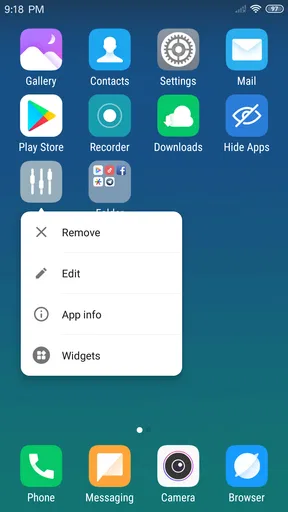
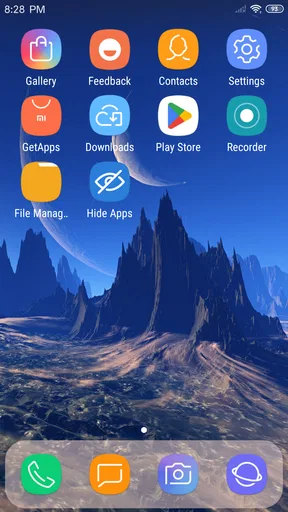
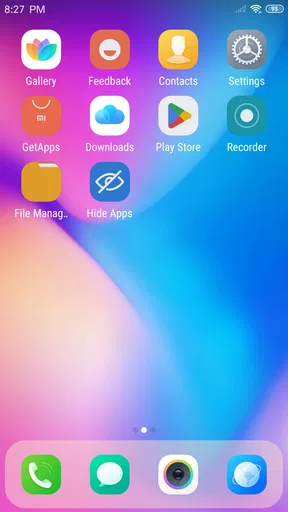
Upon downloading X Launcher Pro from the Google Play Store, I was greeted with an inviting setup screen that walked me through the basics. Installation was a breeze, and within minutes, my Android had transformed into something reminiscent of the latest iOS look. For those of us who relish a bit of customization, the transition felt seamless.
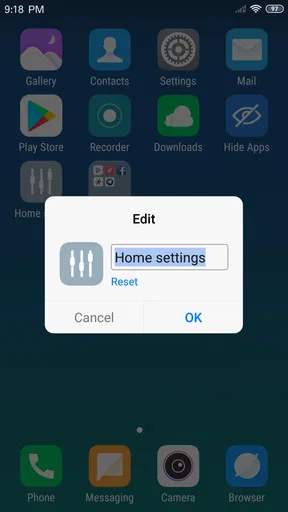
The app offers a range of themes and wallpapers, making it easy to find something that suits your style. Whether you’re into minimalist designs or vibrant, eye-catching aesthetics, there’s likely something here for you. The interface is intuitive, and I appreciated the effort put into making navigation as straightforward as possible. It’s like having the best of both worlds—Android’s flexibility with iOS’s polished design.
Making the first setup feel like your own
For a first-time user, I would treat the initial setup as a quick trial rather than a permanent makeover. Pick a theme that appeals to you, then spend a little time opening the apps you use most. That is a more useful test than judging the wallpaper alone: the home screen has to help you reach familiar tasks comfortably, not merely look convincing in a screenshot.
It is also sensible to keep your first changes simple. Try the new arrangement for a day before reorganizing every icon or changing several visual elements at once. If something feels awkward, you will have a clearer idea of which choice caused the friction. This small, practical approach makes it easier to decide whether the launcher suits you without turning setup into a project.
A useful first success is finding a regular app quickly without reverting to your old habits. Put your most-used apps where your hand naturally expects them, then try the search function when you need something less frequent. If both routes feel comfortable, the new layout is doing more than looking different; it is starting to work for your routine.
Features Galore
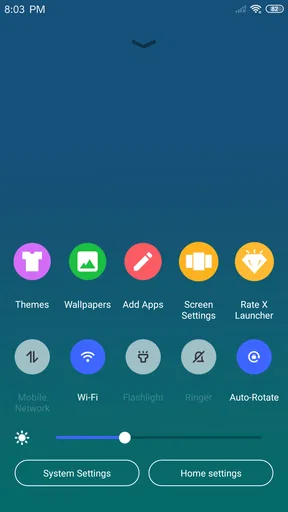
What sets X Launcher Pro apart from its competitors are the plethora of features it packs under the hood. One of my personal favorites is the Control Center, which mimics iOS’s quick-access menu. You can easily adjust settings like Wi-Fi, Bluetooth, and brightness without fumbling through multiple menus. It’s a small touch, but it makes a world of difference in daily use.
The app also supports customizable widgets, which are a staple for any Android user who wants quick access to information. I found the weather widget particularly handy, giving me updates at a glance without having to dive into a separate app.
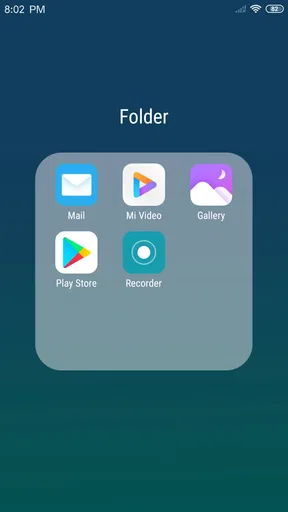
Another nifty feature is the app drawer, which organizes your apps in a way that’s both visually appealing and functional. You can categorize them, making it easier to find what you need when you need it. The search function is quick and responsive, too, which is always a plus.
Small workflow choices that make a difference
The quickest way to tell whether the Control Center is useful for you is to try it during a task you already do repeatedly. For example, when you step into a meeting or settle down to watch something, test whether reaching for a quick setting from the launcher feels easier than your phone’s usual route. If you find yourself pausing to remember a new gesture, the shortcut may not be an improvement for your particular device or muscle memory.
Widgets deserve a similar reality check. A weather display can be handy when you decide what to wear or whether to bring a coat, but it earns its place only if you actually glance at it. I would avoid filling the screen with widgets just because they are available. A clean layout with one useful glanceable item can be more practical than a crowded screen that makes your main apps harder to spot.
For app organization, categories help most when your collection has enough variety to make browsing tedious. Grouping tools, travel apps, or entertainment choices can cut down on searching, but creating too many categories can add another layer of maintenance. I would start with only a few groups you can name naturally, then leave less-used apps in the general drawer rather than forcing every icon into a system.
Performance and Usability
Now, I know what you might be thinking: "Doesn’t all this customization slow down your phone?" In my experience, X Launcher Pro runs smoothly with minimal lag. My device handled multitasking without breaking a sweat, and battery life didn’t take a noticeable hit either, which was a pleasant surprise.
For those worried about privacy, the app requires minimal permissions, ensuring that your data stays secure. It’s always a relief to find an app that respects user privacy without sacrificing functionality.
One practical point for anyone testing a launcher is to judge more than speed. Try your normal routine: open a message, return to the home screen, locate a second app, and use the app drawer. If those transitions feel predictable, you are more likely to keep the setup. If the layout makes common actions slower, visual polish is not a good enough reason to put up with daily annoyance.
There can also be a short adjustment period when familiar Android gestures or manufacturer-specific shortcuts meet a different home-screen design. I would not assume every behavior will match an iPhone just because the visual language does. Keep the phone’s standard settings route in mind while you learn the launcher’s shortcuts, especially if you need to change something quickly and are still building muscle memory.
Who is likely to enjoy it, and who may prefer another route?
This is a good fit for Android owners who enjoy changing the look of their home screen and want an iOS-influenced style without buying a different phone. It may also suit someone who has used an iPhone before and misses the visual organization, but still prefers Android’s app choices and device flexibility. The 50,000-plus installs show that it has found an audience, while the paid price means it is worth considering whether you will use the customization rather than install it just to satisfy a passing curiosity.
If you are already happy with your manufacturer’s launcher, prefer a plain screen, or rarely change your wallpaper and icons, the benefit may be too small to justify paying for another layer of customization. People who want deep control over every visual detail may also prefer a launcher whose options they have compared carefully before committing. And if your real goal is Apple’s services, system behavior, or ecosystem, changing an Android home screen is the wrong tool for that job.
A familiar day is the best test
Imagine checking the weather before leaving home, opening a navigation app on the way out, and later searching for a work tool among a growing collection of apps. This is where the launcher’s elements can earn their place: the glanceable widget can help with the first decision, a settled home-screen layout can make the next tap easy, and the drawer’s categories or search can help with the later one. The value comes from arranging these pieces around your actual routine, not from trying to imitate every detail of another phone.
I would give it a normal day rather than judging it after a few minutes. Notice whether your thumb reaches your important apps comfortably, whether you remember how to access quick controls, and whether the app drawer reduces or adds effort. If you have to keep hunting for a feature you used to find automatically, adjust the layout once before deciding the launcher is not for you. If it still feels less natural after that, returning to your familiar setup is a reasonable choice.
How it compares with other ways to customize Android
The simplest alternative is to keep the launcher already installed on your phone and change only its wallpaper or available home-screen settings. That route is better if you want a small refresh with minimal adjustment. X Launcher Pro makes more sense when you specifically want an iOS-inspired overall appearance and are willing to learn a different arrangement for everyday navigation.
Compared with a highly configurable third-party launcher, the appeal here is the focused visual direction rather than endless tinkering. Someone who wants to tune every detail may prefer to compare broader customization tools; someone who wants a coherent iPhone-like look may appreciate having a more directed starting point. Neither approach is automatically better. The right choice depends on whether you value a recognizable style or granular control more.
It is also different from replacing Android itself. A launcher changes the experience of getting around the phone, but the apps, underlying system, and device remain Android. That makes it a lower-commitment experiment than switching platforms, but it also sets a clear limit: the resemblance is visual and navigational, not a substitute for an iPhone’s full software environment.
Common questions while deciding
If you are wondering whether it is suitable for a first-time launcher user, I think it can be, provided you change things gradually and keep track of what feels unfamiliar. The setup is described as straightforward, and the most useful early test is simply whether you can reach your usual apps. You do not need to redesign the entire phone to find out whether the style works for you.
If you are asking whether it can make an Android phone identical to an iPhone, the honest answer is no: it gives Android an iOS-inspired look, but it does not replace Android or bring Apple’s system and services with it. If your question is whether you must reorganize every app, I would not. Begin with the apps you use every day and add categories only when they solve a real search problem.
The app is rated for Everyone, and its current version is 3.4.12, with Android 5.0 as the minimum operating-system requirement. It was released on January 30, 2018. That makes the compatibility detail easy to check before installing: confirm that your device runs the required Android version, then decide whether a paid visual change is something you will enjoy beyond the first day.
Final Thoughts
In conclusion, if you’re someone who enjoys having the flexibility of Android while coveting the sleekness of iOS, X Launcher Pro is worth considering. It strikes a balance between aesthetics and functionality, offering a range of features that enhance the user experience without overwhelming it.
Whether you’re a customization enthusiast or just someone looking to freshen up their phone’s look, this app delivers on its promise to bring a bit of iOS flair to the Android ecosystem. So, go ahead and give it a try—you might just find that it offers the best of both worlds.
Verdict
Strengths of X Launcher Pro
- Highly customizable interface options.
- Fast and smooth performance.
- Minimal battery consumption.
- Supports various icon packs.
- Regular updates and bug fixes.
Limitations of X Launcher Pro
- Limited widget support.
- Occasional ad pop-ups.
- Some features require payment.
- Compatibility issues with some devices.
- Lacks advanced privacy settings.
Similar Picks in This Category
View All
Canva: AI Photo & Video Editor
Canva4.8

PENUP – Drawing-sharing SNS
Samsung Electronics Co., Ltd.4.5

Crafto
Kutumb App4.6

Sketchbook
Sketchbook4.1

ibis Paint X
ibis inc.4.5

Adobe Express: AI Photo, Video
Adobe4.6
Frequently Asked Questions
What are the main features of X Launcher Pro?
X Launcher Pro offers a sleek interface that mimics the latest iOS design, providing a smooth and customizable user experience. Key features include customizable themes, app icons, and widgets. It also boasts smart gestures, a powerful control center, and an efficient app management system. Users can enjoy an ad-free experience with enhanced performance.
Is X Launcher Pro compatible with all Android devices?
X Launcher Pro is designed to work on a wide range of Android devices. However, it performs best on devices running Android 5.0 (Lollipop) and above. Compatibility might vary with older models, so it’s advisable to check the specific requirements on the app store before downloading.
Does X Launcher Pro affect battery life?
X Launcher Pro is optimized to ensure minimal impact on battery life. Its efficient coding and lightweight design help maintain your device's performance. However, as with any app that changes system operations, some users might notice a slight increase in battery consumption, particularly if using resource-intensive features.
How customizable is X Launcher Pro?
X Launcher Pro offers extensive customization options. Users can personalize themes, change app icons, and select from various widgets to enhance their home screen. The app supports custom wallpapers and icon packs, allowing you to tailor the look and feel to suit your preferences, making your device truly unique.
Is there a free version of X Launcher Pro?
X Launcher Pro itself is a paid application, offering an ad-free experience and premium features. While some launchers offer a free version with basic features, X Launcher Pro is designed for users seeking a comprehensive and professional customization tool without the interruptions of ads.
